Design a Notification System
A notification system is deceptively simple on the surface - accept a message, deliver it to a user - but at scale it becomes a distributed priority queue with multi-channel fan-out, preference filtering, rate limiting, and delivery tracking. The real challenge is handling 10M+ users across push, email, and SMS without spamming anyone or dropping critical alerts.
Practice this design with AI
Get coached through each section in a mock interview setting
Problem Statement & Requirements
A notification system is the plumbing behind every "ding" on your phone. It sounds simple until you realize you need to deliver millions of messages per hour across three different channels, respect user preferences, avoid spamming, track delivery, and handle partial failures gracefully.
Functional Requirements
- -Send notifications via three channels: push (APNs/FCM), email (SMTP), and SMS
- -API for internal services to trigger notifications (not user-facing directly)
- -Template engine: services send a template ID + variables, not raw text
- -User preference management: users opt in/out per notification type per channel
- -Scheduled notifications: send at a future time or within a user's local timezone window
- -Delivery tracking: sent, delivered, opened, failed - per channel
- -Priority levels: critical (password reset, 2FA) vs. standard (social updates) vs. bulk (marketing)
Non-Functional Requirements
- -10M DAU, each receiving ~5 notifications/day = 50M notifications/day
- -Peak QPS: ~1,700 notifications/sec average, ~5,000/sec at peak (3x)
- -p99 delivery latency: <500ms for critical, <5s for standard, <30s for bulk
- -99.99% availability - notification systems are tier-0 infrastructure
- -At-least-once delivery guarantee. Exactly-once is impractical across APNs/FCM/SMS, but deduplicate on the client side.
- -Storage: ~1.5TB/month for notification logs (keep 90 days hot, archive the rest)
Out of Scope
- -In-app notification rendering (that's a client concern)
- -A/B testing notification content
- -Rich media push (images, action buttons) - mention it exists, don't design it
Back-of-Envelope Estimation
Start with 10M DAU and 5 notifications per user per day.
Throughput
- -Total: 10M * 5 = 50M notifications/day
- -Average QPS: 50M / 86,400 = ~580/sec
- -Peak QPS (3x): ~1,740/sec
- -During a big event (Black Friday, major app update), expect 10x spikes: ~5,800/sec. Size your Kafka partitions for this.
Channel breakdown (typical split)
- -Push: 70% = 35M/day
- -Email: 25% = 12.5M/day
- -SMS: 5% = 2.5M/day
- -SMS is expensive ($0.01-0.05 per message). At 2.5M/day, that's $25K-$125K/day in SMS costs alone. Rate-limit SMS aggressively.
Storage
- -Each notification record: ~1KB (IDs, template, channel, status, timestamps)
- -Daily: 50M * 1KB = 50GB
- -Monthly: 50GB * 30 = 1.5TB
- -Keep 90 days hot (4.5TB), archive beyond that to S3/cold storage.
- -Use Cassandra for the notification log - it handles this write volume easily and time-series queries ("get user's last 20 notifications") are its sweet spot.
Cache
- -User preferences: 10M users * 200 bytes = 2GB. Fits in a single Redis instance.
- -Device tokens: 10M users * avg 2 devices * 300 bytes = 6GB. Also fits in Redis.
- -Template cache: maybe 500 templates * 2KB = 1MB. Trivial.
- -Total Redis footprint: ~8GB. One Redis cluster with 3 shards handles this comfortably.
Bandwidth
- -Outbound to APNs/FCM: 35M * 0.5KB payload = 17.5GB/day = ~1.6Mbps average. Not a bottleneck.
- -The bottleneck is connection management to APNs/FCM, not bandwidth. APNs throttles per connection.
API Design
This API is internal - consumed by other backend services, not end users. Keep it simple and opinionated.
Send a notification
- -POST
/api/v1/notifications - -Request:
- -```json
- -
` - -Response 202 Accepted:
- -```json
- -
` - -Always return 202. Delivery is async. The caller gets a batch_id to check status later.
Check delivery status
- -GET
/api/v1/notifications/{notification_id} - -Response 200:
- -```json
- -
`
Get user notification history
- -GET
/api/v1/users/{user_id}/notifications?page=1&limit=20 - -Response 200:
- -```json
- -
`
Update user preferences
- -PUT
/api/v1/users/{user_id}/preferences - -Request:
- -```json
- -
` - -Response 200: echo back the saved preferences.
No delete endpoint for notifications - they're immutable audit records. Mark as read via PATCH /api/v1/notifications/{id} with {"read": true}.
High-Level Architecture
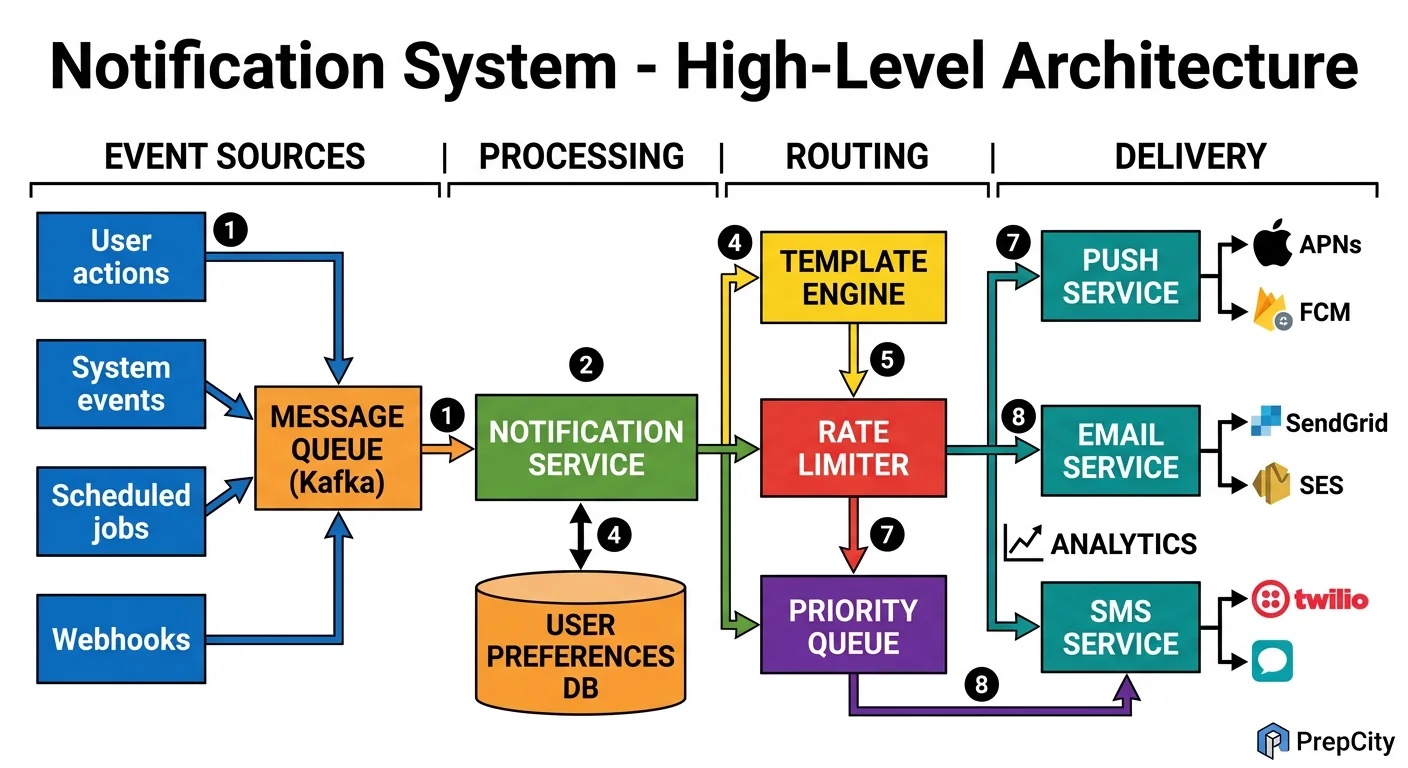
High-Level Architecture
The system is a pipeline: intake → filtering → routing → delivery ? tracking. Each stage is decoupled by Kafka so they scale independently.
Here's how a notification flows through the system
1. A backend service (e.g., the messaging service) calls POST /api/v1/notifications with a template ID, user IDs, and variables.
2. The Notification API Server validates the request, resolves the template, and publishes one message per user to a Kafka topic (partitioned by user_id for ordering guarantees per user).
3. The Preference Filter consumer reads from Kafka, checks the user's preferences in Redis ("does this user want push for new_message notifications?"), and drops the notification if the user opted out. Surviving notifications are published to channel-specific Kafka topics: push-notifications, email-notifications, sms-notifications.
4. Channel Delivery Workers consume from their respective topics
- -Push worker: maintains persistent connections to APNs and FCM, batches notifications, handles token refresh
- -Email worker: renders HTML from template + variables, sends via SendGrid/SES
- -SMS worker: sends via Twilio, applies aggressive rate limiting (no more than 1 SMS per user per hour for non-critical)
5. Each delivery worker writes a delivery receipt back to a Kafka tracking topic. The Tracking Service consumes these and writes to Cassandra (notification log) and updates Redis counters.
Key components
- -Kafka: The backbone. Three topic groups - intake, per-channel, and tracking. 12 partitions per topic minimum.
- -Redis: User preferences, device tokens, rate limit counters, deduplication cache
- -PostgreSQL: Template storage, user accounts (low-write, high-consistency)
- -Cassandra: Notification log (high-write, time-series queries)
- -APNs/FCM/SendGrid/Twilio: External delivery providers
Detailed Component Design
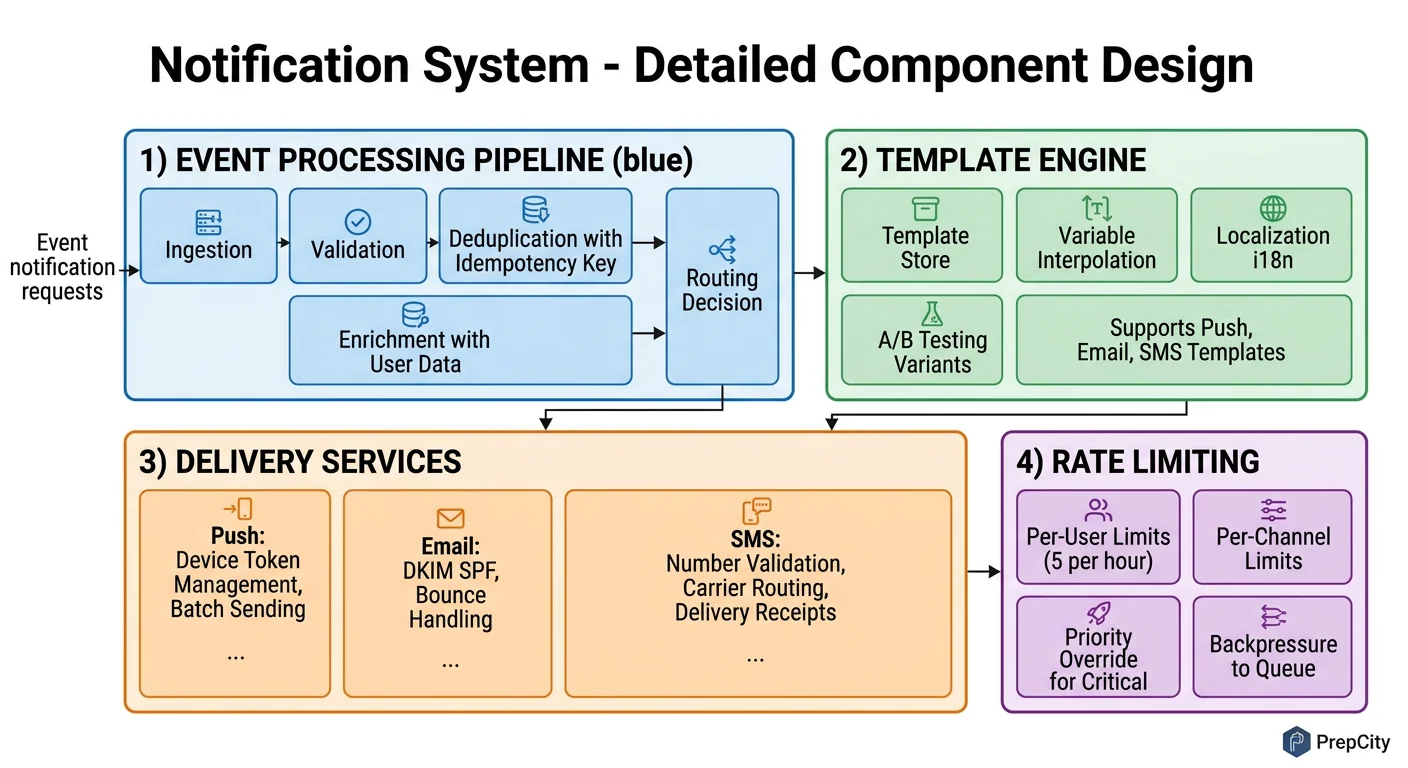
Detailed Component Design
Three components carry the complexity: the preference filtering and rate limiting layer, the push delivery service, and the priority queue system.
Preference Filter + Rate Limiter
This is the gatekeeper. Every notification passes through it before reaching any delivery channel.
Preference check: Look up user preferences in Redis (hash per user: user:{id}:prefs). If the key is missing, fetch from PostgreSQL and populate the cache with a 10-minute TTL. The check is simple - does this user want this notification type on this channel? If not, drop it and log the filter reason.
Rate limiting is more nuanced. Use a sliding window counter in Redis (INCR + EXPIRE). Rules:
- -Critical (2FA, password reset): no rate limit, ever
- -Standard: max 10 push notifications per user per hour
- -Bulk/marketing: max 2 per user per day, only between 9am-9pm in the user's local timezone
Why rate limiting matters: Without it, a bug in an upstream service can send 1000 notifications to every user in seconds. This has happened at real companies (GitHub's notification storm in 2019). The rate limiter is your safety net.
Push Delivery Service
The hardest channel because APNs and FCM have connection limits, token expiry, and platform-specific quirks.
Architecture: A pool of worker processes, each maintaining persistent HTTP/2 connections to APNs and FCM. Use connection pooling - APNs performs best with ~20 concurrent connections per server. More connections don't increase throughput and may trigger throttling.
Device token management: Users have multiple devices. Store all active tokens in Redis as a set (user:{id}:tokens). When APNs returns a "token invalid" response, remove it immediately - sending to invalid tokens degrades your APNs reputation and they'll throttle you.
Batching: FCM supports sending to up to 500 tokens in a single multicast request. Use this aggressively. Batch notifications headed to the same topic/data payload and send as multicast.
Failure handling: On transient failure (5xx from APNs/FCM), retry with exponential backoff (1s, 2s, 4s, max 30s). After 5 retries, write to a dead-letter topic. On permanent failure (invalid token, unregistered device), don't retry - update the token store.
Priority Queue System
Not all notifications are equal. A 2FA code must arrive in <500ms. A marketing email can wait 30 seconds.
Implement priority with separate Kafka topics per priority level: critical, standard, bulk. Each has its own consumer group. Critical consumers get dedicated resources and are never starved. Standard consumers scale based on lag. Bulk consumers run at lower throughput and pause entirely if the system is under load.
This is simpler and more reliable than trying to implement priority within a single topic. Kafka doesn't natively support message priority - fighting against the tool's design is a mistake.
Data Model & Database Design
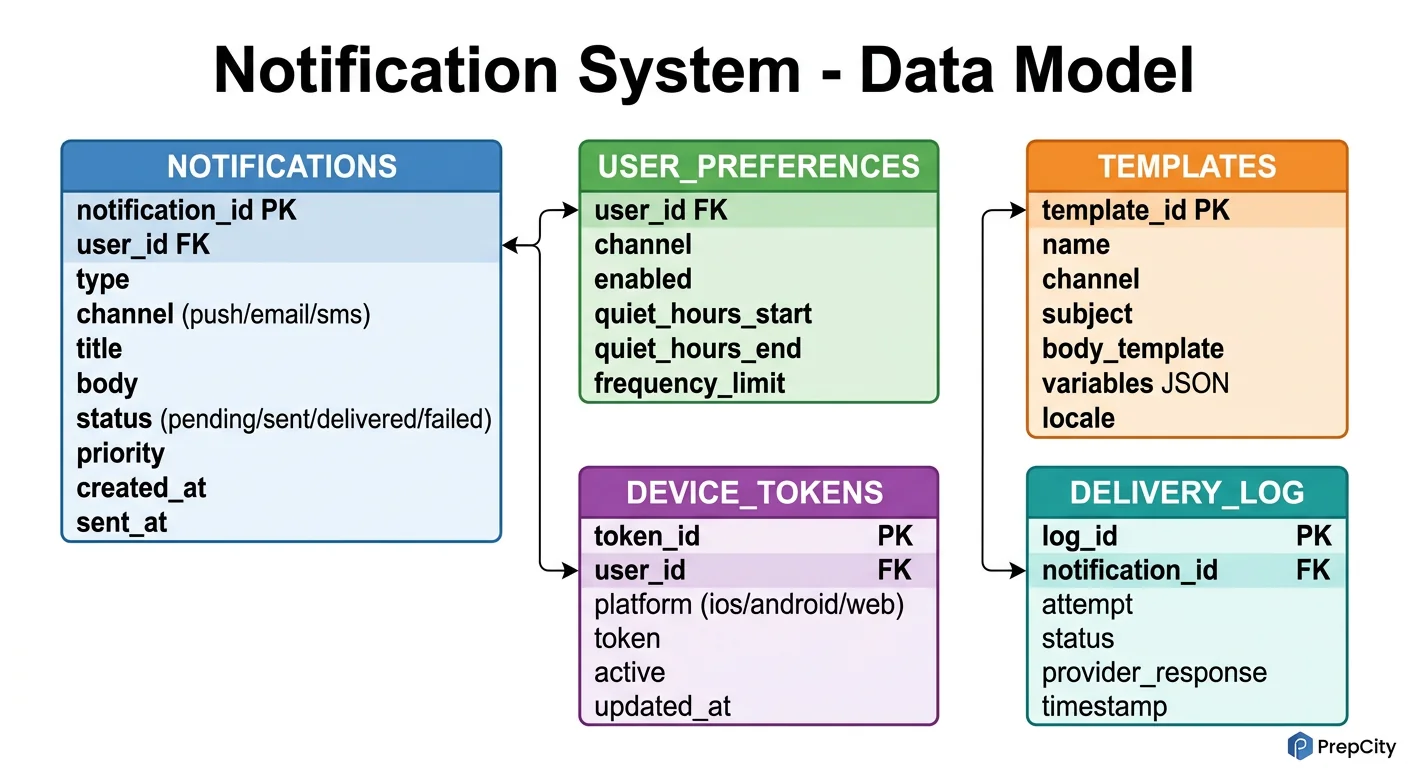
Data Model & Database Design
Two databases: PostgreSQL for structured, low-write data; Cassandra for the high-volume notification log.
PostgreSQL tables
```sql CREATE TABLE users ( user_id UUID PRIMARY KEY DEFAULT gen_random_uuid(), email VARCHAR(255) UNIQUE NOT NULL, phone VARCHAR(20), timezone VARCHAR(50) DEFAULT 'UTC', created_at TIMESTAMPTZ DEFAULT now() );
CREATE TABLE devices ( device_id UUID PRIMARY KEY DEFAULT gen_random_uuid(), user_id UUID NOT NULL REFERENCES users(user_id), platform VARCHAR(10) NOT NULL, -- ios, android, web device_token VARCHAR(512) NOT NULL, is_active BOOLEAN DEFAULT true, updated_at TIMESTAMPTZ DEFAULT now() ); CREATE INDEX idx_devices_user ON devices(user_id) WHERE is_active = true;
CREATE TABLE notification_templates ( template_id VARCHAR(100) PRIMARY KEY, channel VARCHAR(10) NOT NULL, -- push, email, sms title_tmpl TEXT NOT NULL, body_tmpl TEXT NOT NULL, version INT DEFAULT 1 );
CREATE TABLE user_preferences ( user_id UUID REFERENCES users(user_id), notification_type VARCHAR(50), push_enabled BOOLEAN DEFAULT true, email_enabled BOOLEAN DEFAULT true, sms_enabled BOOLEAN DEFAULT false, PRIMARY KEY (user_id, notification_type) ); ```
Why a partial index on devices: Most queries are "get active tokens for user X." The partial index (WHERE is_active = true) keeps the index small and fast. Inactive tokens are dead weight.
Cassandra notification log
CREATE TABLE notifications ( user_id UUID, created_at TIMESTAMP, notification_id UUID, template_id TEXT, channel TEXT, status TEXT, -- queued, sent, delivered, failed priority TEXT, delivered_at TIMESTAMP, PRIMARY KEY ((user_id), created_at, notification_id) ) WITH CLUSTERING ORDER BY (created_at DESC, notification_id ASC);
Partition key is user_id. This means all notifications for a user live on the same Cassandra node, making "get my last 20 notifications" a single-partition query - the fastest possible Cassandra read.
Clustering by created_at DESC gives you reverse chronological order natively. No sorting needed at query time.
Why Cassandra over PostgreSQL for this table: At 50M writes/day with 90-day retention, you're looking at 4.5B rows. Cassandra handles this with linear horizontal scaling. PostgreSQL would need aggressive partitioning and vacuuming. Cassandra's TTL feature also makes retention trivial: INSERT ... USING TTL 7776000 (90 days) and rows auto-delete.
Redis data structures
- -user:{id}:prefs ? Hash of preference settings (10-min TTL)
- -user:{id}:tokens ? Set of active device tokens (no TTL, updated on registration)
- -ratelimit:{user_id}:{channel}:{window} ? Counter for sliding window rate limiting
- -dedup:{notification_hash} ? SET NX with 5-minute TTL to prevent duplicate sends
Deep Dives
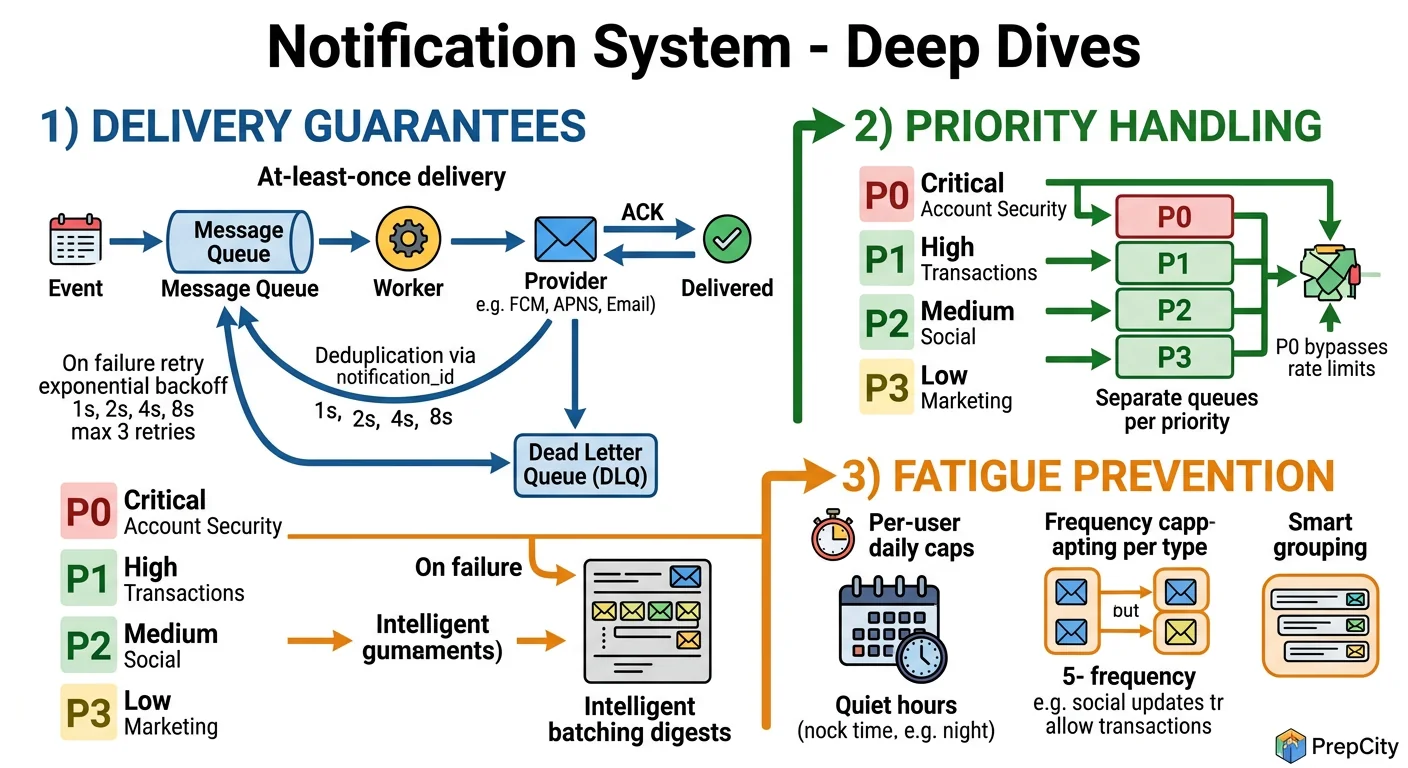
Deep Dives
Deep Dive 1: Fan-out to Millions of Users
The problem: A marketing team wants to send a notification to all 10M users. Naively iterating through users and publishing 10M Kafka messages from a single API call will take forever and probably OOM the API server.
Approach: Two-phase fan-out.
- -Phase 1: The API server publishes a single "broadcast" message to a Kafka topic with the template ID and targeting criteria (e.g., all users, or users in segment X).
- -Phase 2: A set of Fan-out Workers consume the broadcast message, query the user database in batches of 10K (using cursor-based pagination), and publish individual per-user messages to the channel-specific topics.
This spreads the work across multiple workers and keeps the API call fast (~50ms to queue the broadcast). The fan-out itself takes minutes for 10M users, which is fine for marketing notifications.
Tradeoff: This adds a processing delay for bulk notifications (minutes vs. seconds). Critical notifications bypass the fan-out system entirely - they're always per-user from the start.
Deep Dive 2: Exactly-Once Delivery (or as Close as Possible)
The problem: Network blips, Kafka rebalances, and worker restarts can cause the same notification to be processed twice. Sending duplicate push notifications is a terrible user experience.
Approach: Deduplication at multiple layers.
- -Producer side: Before publishing to Kafka, compute a hash of (user_id + template_id + variables + timestamp_bucket). Check Redis with SET NX and a 5-minute TTL. If the key exists, it's a duplicate - drop it.
- -Consumer side: Before calling APNs/FCM, check a dedup key in Redis: dedup:{notification_id}. If it exists, skip. If not, set it with TTL and proceed.
- -Kafka: Enable idempotent producers (enable.idempotence=true) to prevent duplicate messages from producer retries.
This gives you effectively-once delivery. True exactly-once across external systems (APNs, FCM) is impossible - you can't roll back a push notification. But the dedup layers make duplicates extremely rare.
Tradeoff: The Redis dedup adds ~1ms latency per notification and uses ~500MB of memory for the dedup keys. Worth it.
Deep Dive 3: Handling APNs/FCM Outages Gracefully
The problem: APNs goes down for 30 minutes (this happens). You have millions of queued push notifications. What do you do?
Approach: Circuit breaker pattern.
- -Track the error rate over a sliding window (e.g., 1 minute). If >50% of APNs calls fail, trip the circuit breaker.
- -When tripped: stop consuming from the push-notifications Kafka topic. Messages accumulate in Kafka (which handles this fine - it's a log, not a queue).
- -Probe: Every 30 seconds, send a test notification to a canary device. When it succeeds, close the circuit breaker and resume consuming.
- -The backlog drains naturally as consumers catch up. Kafka's consumer lag monitoring tells you exactly how far behind you are.
Why not retry immediately: If APNs is overloaded or down, hammering it with retries makes things worse for everyone. The circuit breaker gives the external service time to recover while keeping your system stable.
Tradeoff: Notifications are delayed during the outage. For critical notifications (2FA codes), maintain a fallback path: if push fails, automatically escalate to SMS.
Trade-offs & Interview Tips
Key Trade-offs:
- -Kafka vs. RabbitMQ: Kafka wins for this use case. You need message replay (for reprocessing after bugs), high throughput, and consumer groups. RabbitMQ is simpler to operate but doesn't scale as cleanly past ~50K messages/sec and lacks native replay. If your interviewer pushes back, acknowledge that RabbitMQ works fine at smaller scale (<1M notifications/day).
- -Cassandra vs. PostgreSQL for notification log: Cassandra. At 50M writes/day, PostgreSQL's MVCC and vacuuming become operational headaches. Cassandra gives you linear write scaling, built-in TTL for retention, and the partition-by-user model maps perfectly to the query pattern. The tradeoff is no ad-hoc joins - if the product team wants complex analytics, ETL to a data warehouse.
- -Template engine vs. raw content in API: Templates, always. They give you centralized control over notification copy, support localization (pass a locale, get the right template), and prevent upstream services from sending malformed content. The minor cost is maintaining a template registry.
- -At-least-once vs. exactly-once: Design for at-least-once with deduplication. True exactly-once across APNs/FCM is impossible. The dedup layer in Redis catches 99.9% of duplicates. The remaining edge cases (Redis down during dedup check) are acceptable - a rare duplicate push is better than a dropped 2FA code.
What I'd do differently
- -Build the rate limiter as a standalone service from day one. It always starts as "just a Redis counter" and grows into a complex beast with per-user, per-channel, per-type, and per-time-window rules. Extract it early.
- -Instrument delivery latency per channel from the start. You can't optimize what you don't measure.
Common interview mistakes
- -Designing a notification system without mentioning user preferences. This is table stakes - every interviewer expects it.
- -Forgetting rate limiting. This is the #1 cause of notification system incidents in production.
- -Treating all notifications equally. If your 2FA code has the same priority as a marketing email, your design is broken.
- -Hand-waving delivery tracking. "We'll store it in a database" isn't enough - explain the schema, the write pattern, and the query pattern.
Interview tips
- -Start with the channel breakdown (push/email/SMS) immediately. It shows you understand the problem has three sub-problems.
- -Draw the Kafka topics explicitly. Show the interviewer you understand the fan-out pattern.
- -Mention specific third-party services (APNs, FCM, Twilio, SendGrid). It signals real-world experience.
- -When discussing scale, lead with the SMS cost calculation. It shows business awareness that interviewers love.
- -If you have time, mention notification grouping (batching 5 "new like" notifications into one "5 people liked your post"). It's a great signal of product thinking.
Ready to be interviewed on this?
Our AI interviewer will test your understanding with follow-up questions
Start Mock Interview