Design a Video Streaming Platform (YouTube / Netflix)
A video streaming platform is one of the hardest system design problems because it touches every layer of the stack: a multi-stage transcoding pipeline, a globally distributed CDN, adaptive bitrate delivery, and petabyte-scale object storage. The core challenge is getting video from upload to playback in multiple resolutions with sub-200ms startup latency for 500M daily users.
Practice this design with AI
Get coached through each section in a mock interview setting
Problem Statement & Requirements
The core product is simple: users upload videos, other users watch them. The hard part is doing this at YouTube/Netflix scale with a smooth playback experience worldwide.
Functional Requirements
- -Upload videos in common formats (MP4, MOV, AVI, MKV) up to 10GB per file
- -Transcode uploads into multiple resolutions (360p, 720p, 1080p, 4K) with adaptive bitrate manifests
- -Search videos by title, description, tags, and category
- -Stream video on any device (desktop, mobile, smart TV) with <2s startup time
- -Like, comment, share, and subscribe interactions
- -Personalized recommendations based on watch history
- -Creator dashboard with upload management and basic analytics
Non-Functional Requirements
- -500M DAU, with peak concurrent viewers around 50M
- -Peak QPS: 500K video segment requests/second during prime time
- -p99 playback start latency: <200ms from CDN edge
- -99.99% availability (52 minutes downtime/year max)
- -Storage growth: ~5PB/month of encoded video
- -Global reach with low latency across 6 continents
Out of Scope
- -Video editing tools, DRM implementation details, payment/subscription billing, and live streaming. These are each system design problems on their own. Acknowledge them, mention where they plug in, and move on.
Back-of-Envelope Estimation
Start with DAU and work down. 50M DAU is a reasonable mid-scale estimate (YouTube is 2B+ monthly, but scope it to what you can reason about).
Write path (uploads)
- -100K videos uploaded per day
- -Average QPS: 100K / 86400 = ~1.2 uploads/sec
- -Peak (3x): ~4 uploads/sec
- -Uploads are bursty but low-QPS. The bottleneck is transcoding time, not request volume.
Read path (video views)
- -50M users * 5 videos/day = 250M views/day
- -Each view fetches ~100 video segments (for a 10-min video at 6s chunks)
- -Segment requests: 250M * 100 = 25B segment fetches/day
- -Average segment QPS: 25B / 86400 = ~290K/sec
- -Peak (3x): ~870K segment requests/sec. This is why you need a CDN.
Storage
- -Each uploaded video produces ~5 renditions (360p through 4K). Raw upload averages 500MB, total encoded output averages ~1GB.
- -Daily: 100K * 1GB = 100TB/day
- -Monthly: ~3PB. Yearly: ~36PB.
- -Use S3 or GCS with lifecycle policies. Move cold content to infrequent access after 90 days.
Bandwidth
- -Average segment = 2MB. At 290K segments/sec = 580TB/sec... obviously not from origin.
- -CDN serves 95%+ of this. Origin bandwidth: ~29TB/sec (5% cache misses). Still enormous - you need a multi-tier CDN.
Cache
- -80/20 rule: 20% of videos get 80% of views. Cache hot video metadata in Redis.
- -20% of 100K daily videos = 20K videos * 1KB metadata = 20MB. Trivial. Cache aggressively.
API Design
Keep the API surface small. Video upload uses multipart; everything else is JSON over REST.
Upload a video
- -POST
/api/v1/videos - -Content-Type: multipart/form-data
- -Body fields: title (string, required), description (string), video_file (binary, required), tags (string[]), category (string)
- -Response 202 Accepted:
- -```json
- -
` - -Return 202, not 201. The video isn't ready yet - transcoding happens async.
Get video metadata + streaming URLs
- -GET
/api/v1/videos/{video_id} - -Response 200:
- -```json
- -
` - -The manifest_url points to an HLS/DASH manifest. The client player handles adaptive bitrate switching from there.
Search videos
- -GET
/api/v1/videos/search?q=system+design&page=1&limit=20 - -Response 200:
- -```json
- -
`
Record interaction
- -POST
/api/v1/videos/{video_id}/interactions - -Body: {"type": "like"} or {"type": "view", "watch_time_sec": 245}
- -Response 204 No Content
- -Fire-and-forget from the client. These get batched and processed async.
All endpoints use Bearer token auth. Rate limit headers (X-RateLimit-Remaining, X-RateLimit-Reset) on every response.
High-Level Architecture
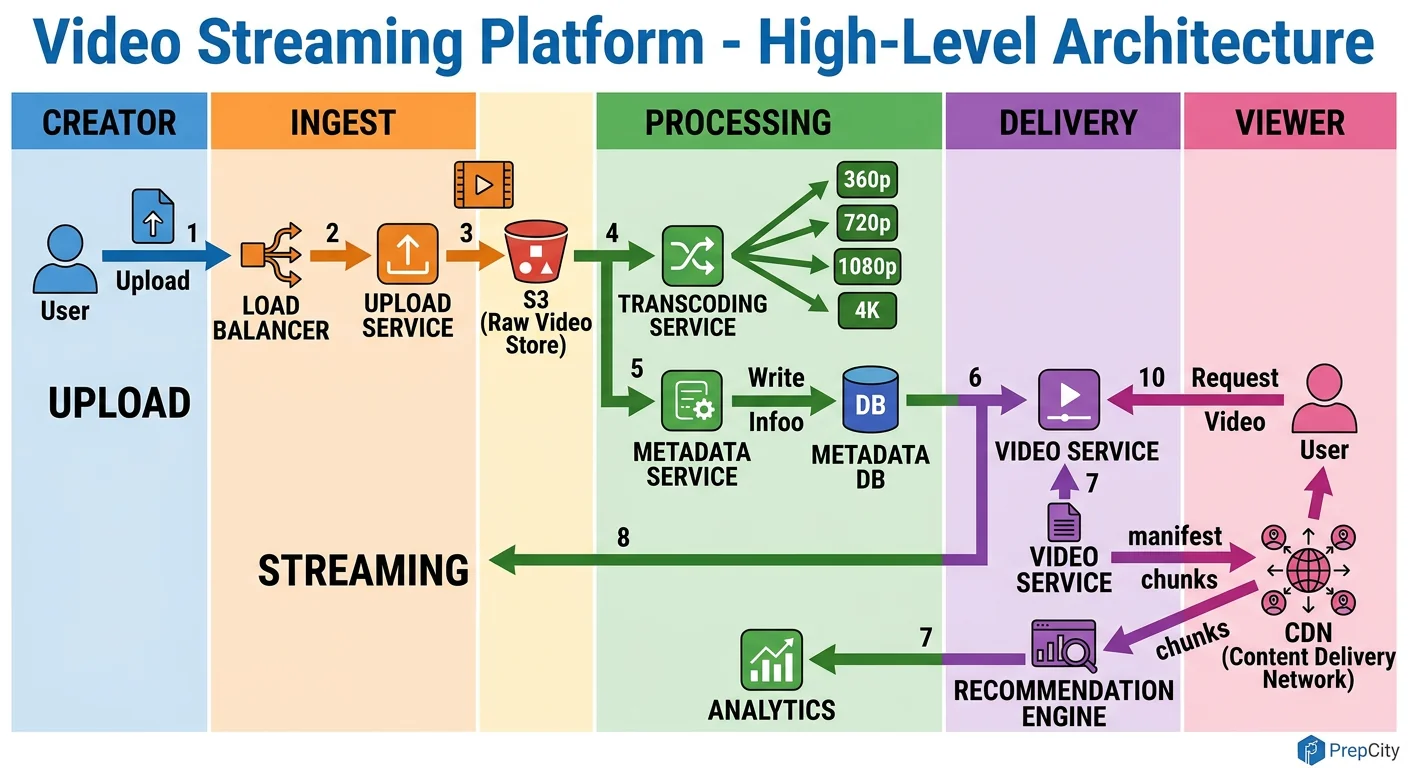
High-Level Architecture
The system splits cleanly into two paths: the upload/transcode pipeline (write) and the viewing/streaming pipeline (read). They share a metadata store but are otherwise independent.
Upload flow
1. Client uploads video to an API gateway behind an L7 load balancer. 2. The API server validates the request, stores the raw file in S3 (object storage), writes metadata to PostgreSQL with status='processing', and drops a message onto a Kafka topic. 3. The Transcoding Service picks up the Kafka message. It pulls the raw file from S3, runs FFmpeg to produce HLS segments at multiple bitrates (360p, 720p, 1080p, 4K), generates thumbnails, and writes everything back to S3. 4. On completion, it updates the metadata row to status='available' and publishes a CDN invalidation so edge caches can start pulling the new content.
Viewing flow
1. Client calls GET /api/v1/videos/{id}. The API server checks Redis for cached metadata. On cache miss, it reads from a PostgreSQL read replica and populates the cache. 2. The response includes a CDN manifest URL (e.g., master.m3u8 for HLS). 3. The video player fetches the manifest from the CDN edge. The edge either serves cached segments or pulls from the S3 origin. 4. The player uses adaptive bitrate logic - it starts at a conservative quality and ramps up based on measured throughput.
Key components
- -Load Balancer (Nginx/ALB): Routes API traffic and terminates TLS
- -API Servers (stateless): Handle all CRUD operations, produce Kafka messages
- -Kafka: Decouples uploads from transcoding. Handles backpressure when upload volume spikes.
- -Transcoding Workers: Stateless containers that pull jobs from Kafka. Scale horizontally with Kubernetes HPA.
- -S3/GCS: Stores raw uploads and all encoded renditions
- -CDN (CloudFront/Akamai): Caches video segments at 200+ edge locations worldwide
- -PostgreSQL: Stores video metadata, user data, interactions
- -Redis: Caches hot metadata, session data, and rate limit counters
Detailed Component Design
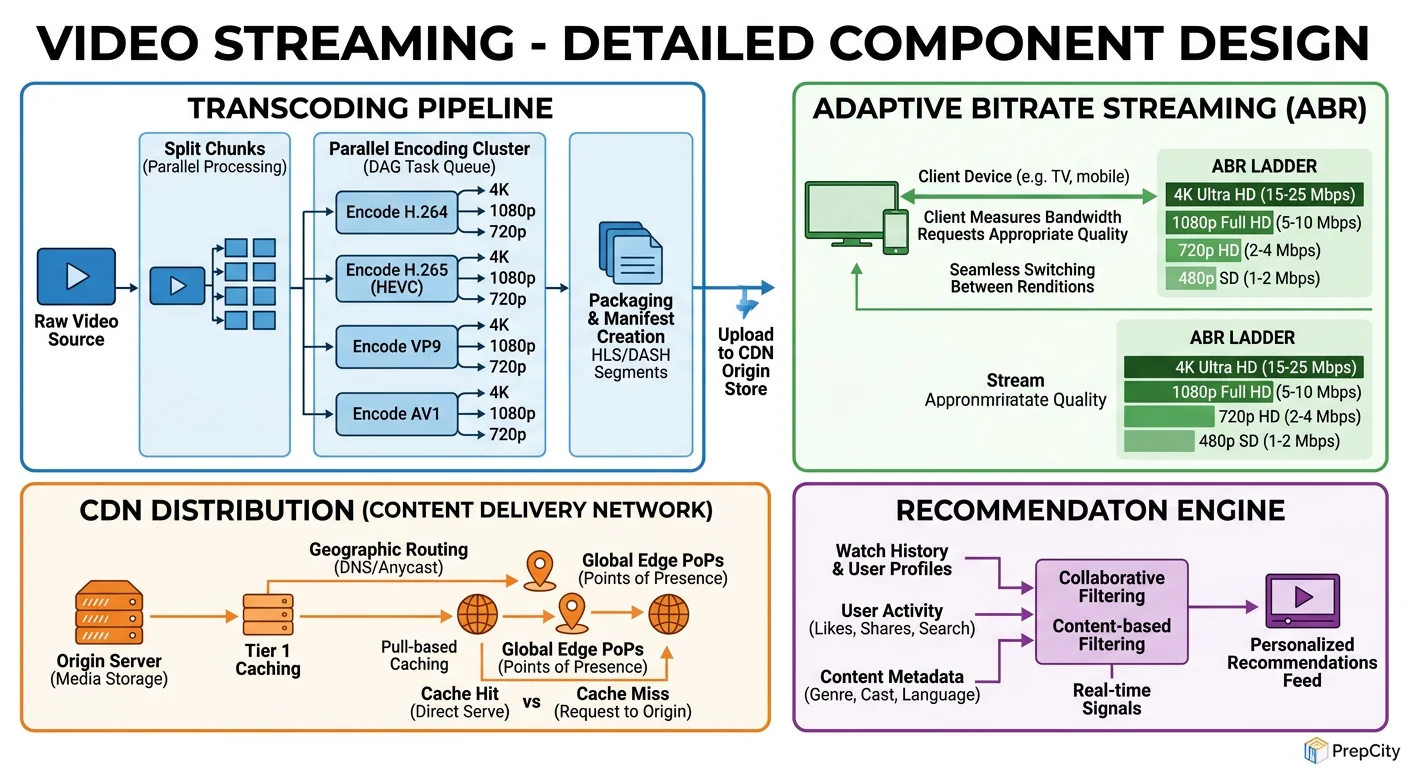
Detailed Component Design
Three components deserve deep attention: the transcoding pipeline, the CDN layer, and the metadata store.
Transcoding Pipeline
This is the most compute-intensive part of the system. A single 1080p video takes 2-10 minutes to transcode depending on length and codec.
Architecture: Kafka topic → worker pods (Kubernetes) → FFmpeg → S3. Each worker pulls one job, downloads the raw file, transcodes it into all target renditions, uploads segments to S3, and acknowledges the Kafka offset.
Why Kafka over SQS or RabbitMQ: Kafka gives you ordered processing per partition, replay capability (critical when a bad FFmpeg config corrupts outputs and you need to reprocess), and natural backpressure. If workers fall behind, messages queue up - you scale workers, not redesign the system.
Key decisions
- -Use H.264 for broad compatibility, H.265 for 4K (30-50% smaller files, but slower to encode)
- -Segment videos into 6-second chunks for HLS. Shorter chunks = faster quality switching but more HTTP requests. 6s is the industry sweet spot.
- -Generate a master manifest with all renditions. The player picks the right one.
- -On failure: retry up to 3 times with exponential backoff. After that, dead-letter queue for manual investigation. Monitor the DLQ length - a spike means a systemic issue (bad codec, S3 outage).
CDN Layer
The CDN handles 95%+ of all read traffic. Without it, this system doesn't work at scale.
Architecture: Multi-tier - edge PoPs (200+ locations) → regional mid-tier caches → S3 origin. A request misses at the edge, hits the regional cache, and only falls through to origin as a last resort.
Why multi-tier matters: A single-tier CDN means every cache miss hits S3 directly. With 870K segment requests/sec at peak and even a 5% miss rate, that's 43K requests/sec to S3. A regional mid-tier absorbs most of those misses, reducing origin load to <1% of total traffic.
Cache strategy: Set TTL to 7 days for video segments (immutable content, never changes). Set TTL to 5 minutes for manifests (may update when new renditions become available). Use consistent hashing to route segment requests to specific edge servers - this maximizes cache hit rate.
Metadata Store (PostgreSQL)
Use PostgreSQL, not Cassandra, for metadata. The data is relational (videos belong to users, comments reference videos), the write volume is low (~4 QPS peak for uploads), and you need ACID for things like updating view counts without losing writes.
Scale reads with 3-5 read replicas behind PgBouncer. Cache hot rows in Redis with a 60-second TTL.
For the videos table, partition by upload_date (monthly). This keeps recent queries fast (users mostly browse recent content) and lets you archive old partitions to cheaper storage.
Data Model & Database Design
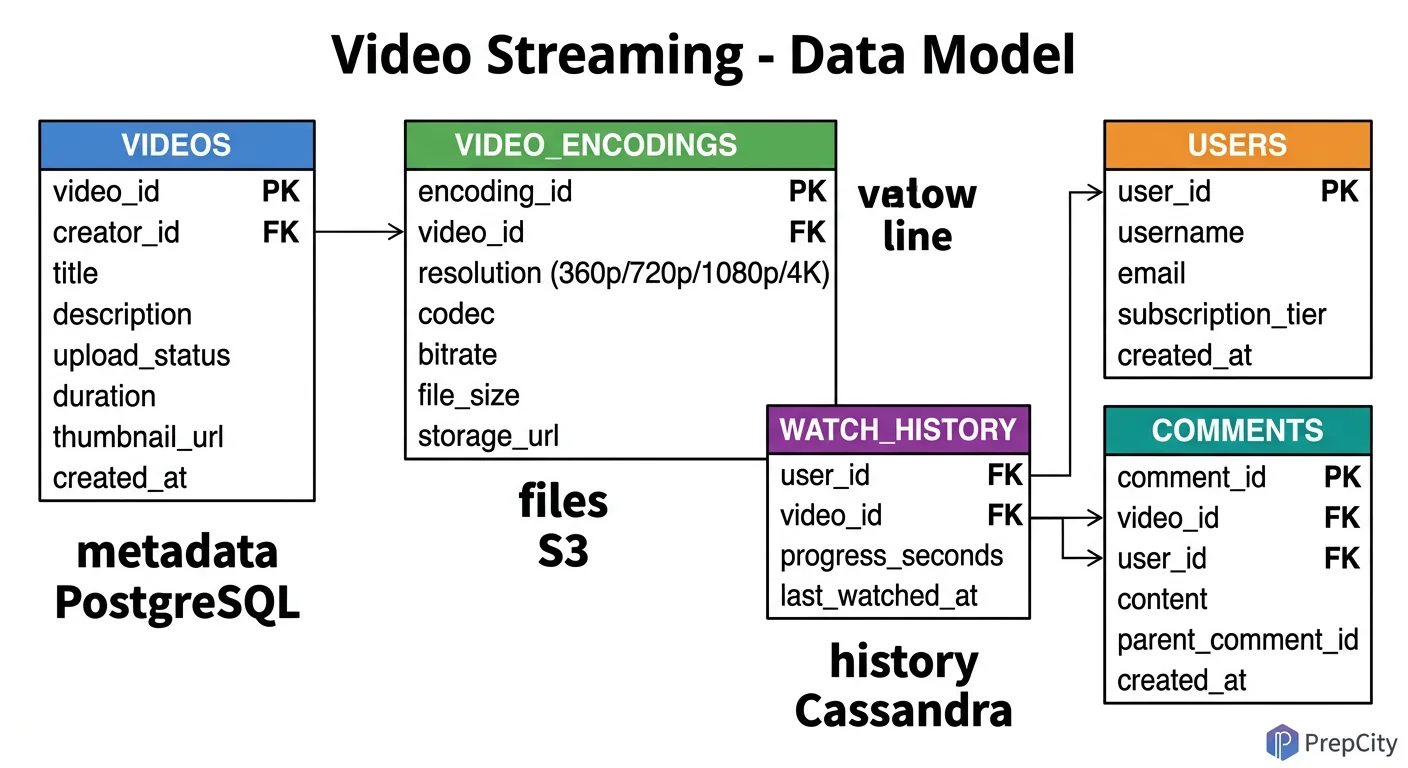
Data Model & Database Design
Use PostgreSQL for structured metadata and S3 for binary content. Don't overthink this - a relational DB handles the query patterns perfectly at this write volume.
videos table
sql CREATE TABLE videos ( video_id UUID PRIMARY KEY DEFAULT gen_random_uuid(), user_id UUID NOT NULL REFERENCES users(user_id), title VARCHAR(255) NOT NULL, description TEXT, category VARCHAR(100), tags TEXT[], s3_raw_path VARCHAR(500) NOT NULL, status VARCHAR(20) DEFAULT 'processing', -- processing | available | failed duration_sec INT, view_count BIGINT DEFAULT 0, like_count INT DEFAULT 0, created_at TIMESTAMPTZ DEFAULT now() ) PARTITION BY RANGE (created_at); `` Partition monthly. Index on (user_id), (status), and GIN index on (tags) for tag-based queries.
users table
sql CREATE TABLE users ( user_id UUID PRIMARY KEY DEFAULT gen_random_uuid(), username VARCHAR(100) UNIQUE NOT NULL, email VARCHAR(255) UNIQUE NOT NULL, password_hash VARCHAR(255) NOT NULL, subscriber_count INT DEFAULT 0, created_at TIMESTAMPTZ DEFAULT now() );
video_renditions table
sql CREATE TABLE video_renditions ( rendition_id UUID PRIMARY KEY DEFAULT gen_random_uuid(), video_id UUID NOT NULL REFERENCES videos(video_id), resolution VARCHAR(10) NOT NULL, -- 360p, 720p, 1080p, 4k bitrate_kbps INT NOT NULL, codec VARCHAR(20) NOT NULL, -- h264, h265 manifest_url VARCHAR(500) NOT NULL, segment_count INT NOT NULL, created_at TIMESTAMPTZ DEFAULT now() ); `` Index on (video_id). This table lets you query what renditions exist for a video and build the master manifest.
view_events (for analytics - use Kafka + ClickHouse, not PostgreSQL)
- -Don't store per-view rows in PostgreSQL. At 250M views/day, that's a write-heavy analytics workload.
- -Stream view events through Kafka into ClickHouse (columnar, built for aggregation).
- -Schema: user_id, video_id, watch_time_sec, device_type, country, timestamp.
- -ClickHouse partitions by day, orders by (video_id, timestamp) for fast per-video analytics.
Why not Cassandra for metadata: The write volume doesn't justify it. PostgreSQL with read replicas handles 4 writes/sec and 3K reads/sec trivially. Cassandra adds operational complexity (compaction tuning, consistency level headaches, no joins) for zero benefit at this scale.
Deep Dives
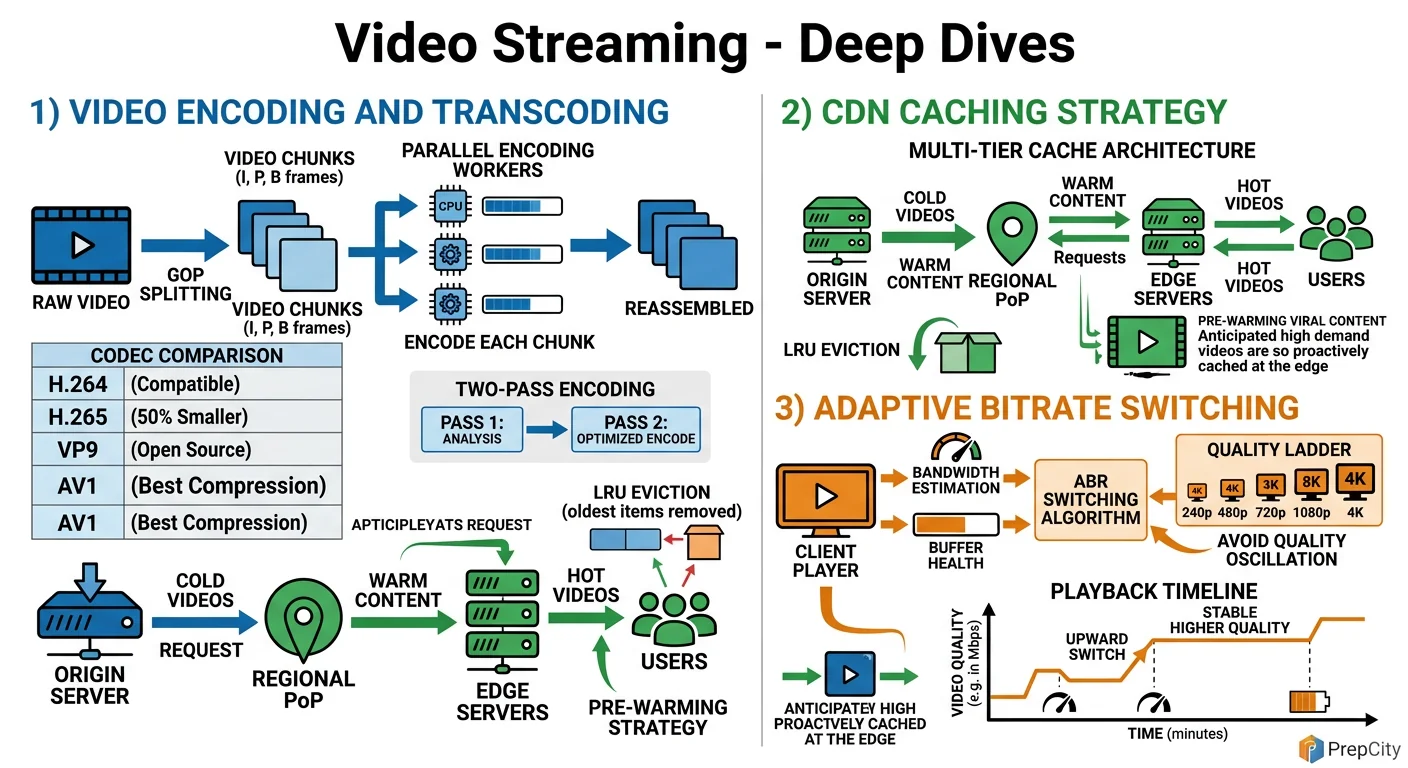
Deep Dives
Deep Dive 1: Adaptive Bitrate Streaming - Making Playback Smooth
The problem: Users have wildly different network conditions. Someone on fiber should get 4K; someone on a subway should get 360p without buffering. Static quality selection doesn't work.
Approach: Encode every video into 4-6 renditions. Serve an HLS manifest listing all renditions with their bandwidth requirements. The client player measures its download speed every few segments and switches renditions accordingly.
The subtlety is in chunk boundaries. Every rendition must have identical segment boundaries (same GOP structure) so the player can switch mid-stream without visual artifacts. This means your FFmpeg command forces keyframe intervals at exact chunk boundaries: -force_key_frames "expr:gte(t,n_forced*6)" for 6-second segments.
Tradeoff: More renditions = smoother adaptation but more storage and encoding time. 6 renditions (240p, 360p, 480p, 720p, 1080p, 4K) is the standard Netflix/YouTube approach. Diminishing returns beyond that.
Deep Dive 2: Scaling Transcoding to Handle Upload Spikes
The problem: A viral creator uploads a video and 10K other creators upload simultaneously. Your transcoding queue backs up, and videos take hours to become available.
Approach: Kubernetes HPA (Horizontal Pod Autoscaler) scales worker pods based on Kafka consumer lag. When lag exceeds a threshold (e.g., >1000 unprocessed messages), spin up more workers. Scale down when lag drops.
But HPA alone isn't enough at 100x scale. Add priority queues - verified creators and trending channels get priority transcoding. Implement this with separate Kafka topics (high-priority, normal, bulk) and dedicated consumer groups for each.
For extreme scale, consider splitting transcoding by rendition. Instead of one worker producing all renditions, have separate workers for each resolution. This parallelizes the work per video from ~10 minutes (sequential) to ~3 minutes (parallel). The trade-off is more S3 reads (each worker downloads the raw file independently), but S3 bandwidth is cheap.
Deep Dive 3: CDN Cache Invalidation and Cold-Start
The problem: When a new video goes live, no CDN edge has it cached. The first viewers in each region all hit origin simultaneously - a thundering herd problem.
Approach: Pre-warm the CDN. After transcoding completes, push the first few segments (covering the first 30 seconds of playback) to all major edge PoPs proactively. Use the CDN's push/preload API (CloudFront has this, Akamai has Netstorage).
For cache invalidation (e.g., creator deletes a video or replaces it), use the CDN's purge API. But purge is slow (can take 5-30 seconds across all edges). For immediate effect, change the manifest URL with a version parameter (e.g., ?v=2) so the old cached version is simply never requested again.
Tradeoff: Pre-warming costs bandwidth and storage at every edge. Only pre-warm for videos predicted to get high traffic (verified creators, scheduled premieres). For long-tail content, accept the cold-start penalty - it affects <1% of viewers.
Trade-offs & Interview Tips
Key Trade-offs:
- -Managed CDN vs. self-built: Use Akamai/CloudFront. Building your own CDN is a multi-year, multi-hundred-million-dollar project. Netflix built their own (Open Connect) because they represent 15% of global internet traffic. You don't. Use a managed CDN and negotiate pricing.
- -H.264 vs. H.265/VP9/AV1: H.264 has universal hardware decoder support. H.265 gives 30-50% better compression but has licensing fees and spotty browser support. VP9 is royalty-free (Google). AV1 is the future (royalty-free, best compression) but encoding is 10x slower. Serve H.264 as baseline, add AV1 for clients that support it.
- -PostgreSQL vs. NoSQL for metadata: PostgreSQL wins here. The write volume is trivially low, the data is relational, and you need joins. Cassandra advocates will push for it, but it adds operational complexity with zero benefit for this access pattern.
- -Synchronous vs. async transcoding: Always async. Never make the user wait for transcoding. Upload → 202 Accepted → Kafka → background processing. Show "processing" status in the UI. This is non-negotiable.
What I'd do differently in hindsight
- -Start with fewer renditions (360p, 720p, 1080p only) and add 4K later. 4K doubles your storage costs and most viewers don't watch in 4K.
- -Invest in a proper video fingerprinting service early. Duplicate detection saves massive amounts of storage and transcoding compute.
Common interview mistakes
- -Jumping straight to CDN without explaining the transcoding pipeline. The interviewer wants to see you understand the full write path, not just the read path.
- -Saying "use a CDN" without explaining multi-tier caching, TTL strategy, or cache invalidation. That's hand-waving.
- -Ignoring the cold-start problem for new videos. Mention pre-warming.
- -Designing the metadata store for write scale that doesn't exist. 4 writes/sec doesn't need Cassandra.
Interview tips
- -Draw the upload and viewing paths separately. They're different systems that share a database.
- -Spend 60% of your time on transcoding + CDN. That's where the hard problems are.
- -Mention specific numbers: 6-second HLS chunks, H.264 CRF values, CDN cache hit ratios (aim for >95%).
- -If asked about live streaming, say it's a separate system with a real-time transcoding pipeline (no pre-processing) and WebRTC or low-latency HLS. Don't try to bolt it onto the VOD architecture.
Ready to be interviewed on this?
Our AI interviewer will test your understanding with follow-up questions
Start Mock Interview