Design a Web Crawler
A web crawler is deceptively simple on the surface - fetch pages, extract links, repeat - but at scale it becomes one of the hardest distributed systems problems. The real challenges are politeness (not DDoSing websites), deduplication (the web is full of duplicate content), and managing a frontier of billions of URLs without losing progress or wasting resources.
Practice this design with AI
Get coached through each section in a mock interview setting
Problem Statement & Requirements
A web crawler fetches pages, extracts links, and repeats - but doing this at internet scale is where it gets interesting. The core tension is between crawl speed and politeness: you want to discover billions of pages quickly without hammering any single server.
Functional Requirements
- -Accept seed URLs and recursively discover new URLs by parsing HTML
- -Extract page content (title, headings, body text, metadata) and store it for downstream indexing
- -Respect robots.txt - non-negotiable, both legally and ethically
- -Deduplicate URLs to avoid infinite loops and wasted fetches
- -Enforce per-domain politeness: max 1 request/second/domain by default
- -Handle HTTP status codes gracefully (200, 301, 404, 429, 503) with retry logic
- -Support configurable crawl depth and per-domain page limits
Non-Functional Requirements
- -Throughput: 10,000 URLs/second sustained crawl rate
- -Storage: 1 billion pages initially, growing ~10%/month
- -Latency: p99 < 500ms per page fetch-and-parse cycle
- -Availability: 99.99% uptime - a crawler that stops crawling falls behind fast
- -Initial storage capacity: 10TB, growing ~1TB/month for metadata (raw HTML stored separately)
Out of Scope
- -JavaScript rendering (requires headless browsers - entirely different beast)
- -Dynamic content extraction or SPA crawling
- -Full search engine indexing/ranking - this is crawl-only
Back-of-Envelope Estimation
Target: 100 million unique URLs crawled per day.
QPS Math
- -Read QPS (fetching from frontier): 100M URLs / 86,400 seconds = ~1,160 URLs/sec
- -Each crawled page discovers ~5 new URLs on average
- -Write QPS (adding to frontier): 1,160 Ã - 5 = ~5,800 URLs/sec
- -Peak (3x): ~3,500 read QPS, ~17,400 write QPS
Storage
- -Average page size after parsing: ~500KB (HTML + extracted text + metadata)
- -Daily: 100M Ã - 500KB = 50TB/day - this is enormous
- -Monthly: ~1.5PB. You need object storage (S3), not a database, for raw content
- -Metadata only (URL, status, timestamps): ~200 bytes/URL = 20GB/day - this fits in a database
Bandwidth
- -Outbound fetching: 1,160 URLs/sec à - 500KB = ~565 MB/sec = ~4.5 Gbps
- -You need serious network capacity. This is why large crawlers run in data centers, not on cloud VMs
Memory for deduplication
- -1 billion URLs in a Bloom filter at 0.01% false positive rate ? 2.4GB
- -Fits comfortably on a single machine. No need to distribute the Bloom filter initially
Key takeaway: the bottleneck is network bandwidth and politeness constraints, not compute. Most of the time your crawler is waiting on DNS or HTTP responses.
API Design
A web crawler is mostly an internal system, but it needs management APIs for operations. Keep them simple.
Submit Seed URLs
- -POST
/api/v1/crawler/seeds - -Request:
- -```json
- -
` - -Response (202 Accepted):
- -```json
- -
`
Get Crawler Status
- -GET
/api/v1/crawler/status - -Response:
- -```json
- -
`
Pause/Resume Crawler
- -POST
/api/v1/crawler/control - -Request:
- -```json
- -
` - -Response:
- -```json
- -
`
Get Page Details
- -GET
/api/v1/crawler/pages/{url_hash} - -Response:
- -```json
- -
`
Note: the crawler itself doesn't serve external traffic. These APIs are for your ops team to monitor and control the crawl. Authentication via internal service mesh is sufficient - no need for API keys.
High-Level Architecture
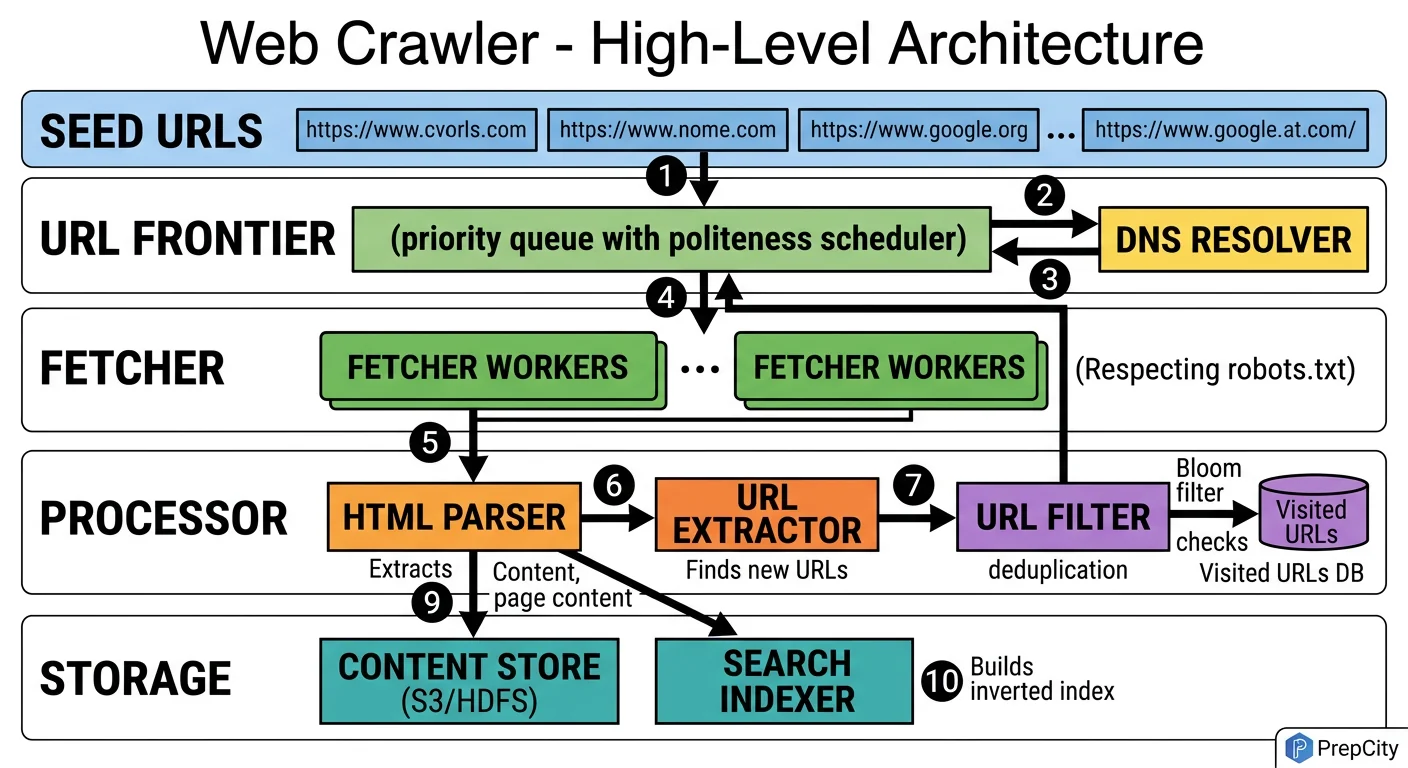
High-Level Architecture
The architecture follows a producer-consumer pattern with the URL Frontier as the central coordination point.
Here's how a URL flows through the system
1. Seed URLs enter the URL Frontier, which is a priority queue backed by Redis sorted sets. Each URL gets a priority score based on domain authority, freshness, and crawl depth.
2. Crawler Workers (the consumers) pull URLs from the frontier in priority order. Before fetching, each worker checks the politeness enforcer - a per-domain rate limiter that ensures no domain gets hit more than once per second.
3. The worker resolves DNS (hitting a local DNS cache first - DNS resolution is surprisingly expensive at scale), then fetches the page via HTTP.
4. The raw HTML goes to the Content Extractor, which pulls out text, metadata, and outgoing links. Raw HTML is written to blob storage (S3). Structured metadata goes to the metadata database (PostgreSQL).
5. Extracted URLs pass through the URL Deduplicator (Bloom filter) before being added back to the frontier. This prevents re-crawling pages we've already seen.
6. A separate robots.txt service caches and serves robots.txt rules. Workers check it before every fetch. Cache TTL is 24 hours per domain.
Key design decisions
- -Workers are stateless - any worker can process any URL. This makes horizontal scaling trivial.
- -The frontier is the single source of truth for crawl state. If a worker dies mid-crawl, the URL's lease expires and another worker picks it up.
- -Blob storage for HTML, relational DB for metadata. Mixing these would be a mistake - they have completely different access patterns and scale characteristics.
Detailed Component Design
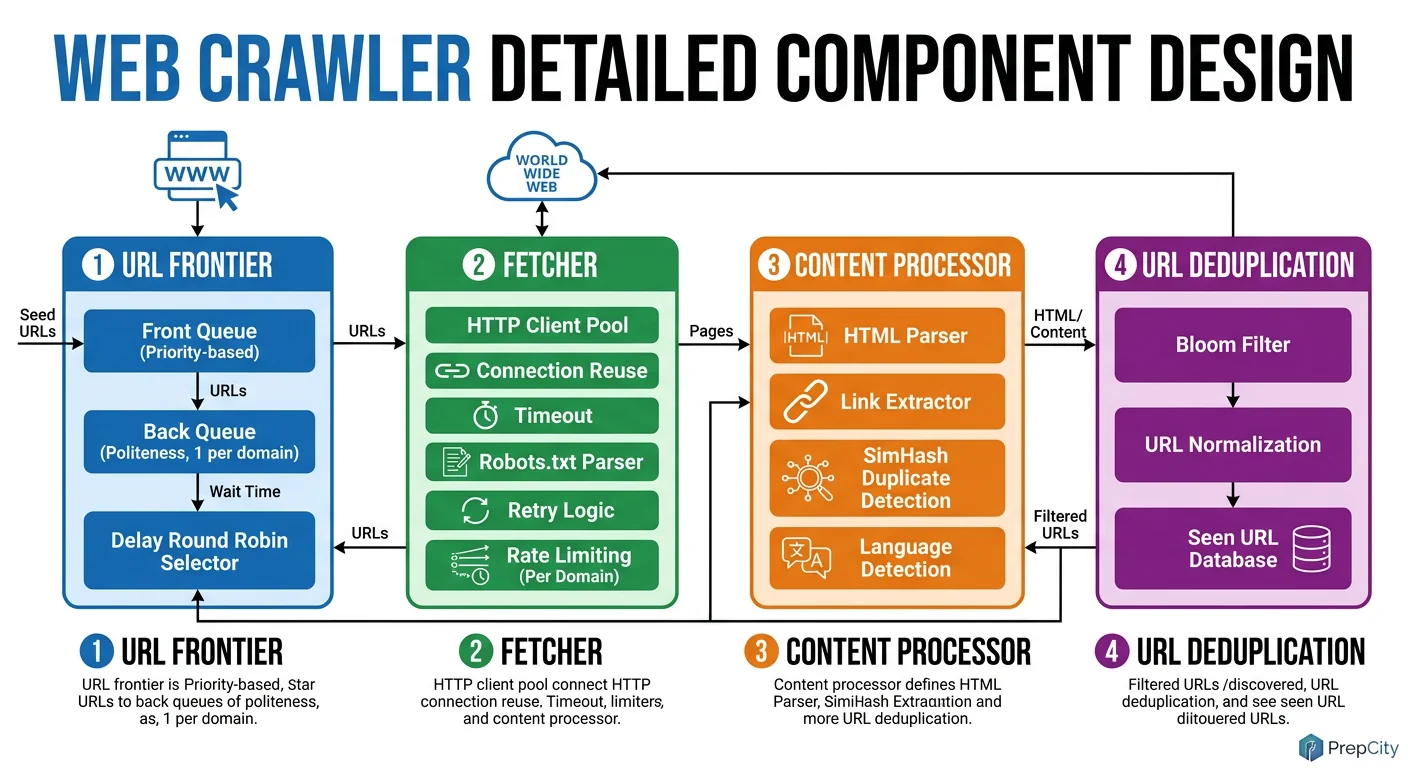
Detailed Component Design
Three components deserve deep attention: the URL Frontier, the Downloader, and the Politeness Enforcer.
URL Frontier
The frontier is the heart of the crawler. Use Redis sorted sets - the score is the URL's priority, and ZPOPMIN gives you the highest-priority URL in O(log N).
Why Redis over Kafka here? Kafka is great for append-only streams, but a crawler frontier needs priority ordering and deduplication. Redis sorted sets give you both. Shard the frontier across 10-20 Redis instances using consistent hashing on the URL's domain. This naturally groups same-domain URLs on the same shard, which simplifies politeness enforcement.
The Bloom filter for dedup sits in front of the frontier. At 1 billion URLs with a 0.01% false positive rate, it's ~2.4GB - fits in RAM. Use RedisBloom or a standalone in-memory filter. False positives mean occasionally skipping a valid URL, which is acceptable. False negatives (re-crawling duplicates) would waste resources.
Downloader
Use async I/O (aiohttp in Python, or better yet, a Go worker pool with goroutines). A single worker machine with 1,000 concurrent connections can sustain ~500 fetches/sec, limited mainly by network latency. You need ~20 worker machines for 10K URLs/sec.
Every worker maintains a local DNS cache. Without it, you'd be doing thousands of DNS lookups per second, and public DNS resolvers will rate-limit you. Cache TTL of 5 minutes is a good balance between freshness and performance.
Timeout configuration matters: 10 seconds for connection, 30 seconds for full response. Anything slower than that is likely a broken server, and you're wasting a connection slot.
Politeness Enforcer
This is the component interviewers care about most. Implement it as a token bucket per domain: each domain gets 1 token per second. When a worker wants to fetch from example.com, it consumes a token. No token available? The URL goes back to the frontier with a delayed score.
Store token buckets in the same Redis shard as the domain's URLs. This avoids cross-shard coordination for politeness checks. The enforcer also caches robots.txt rules per domain (24h TTL) and rejects disallowed paths before they even reach the downloader.
Data Model & Database Design
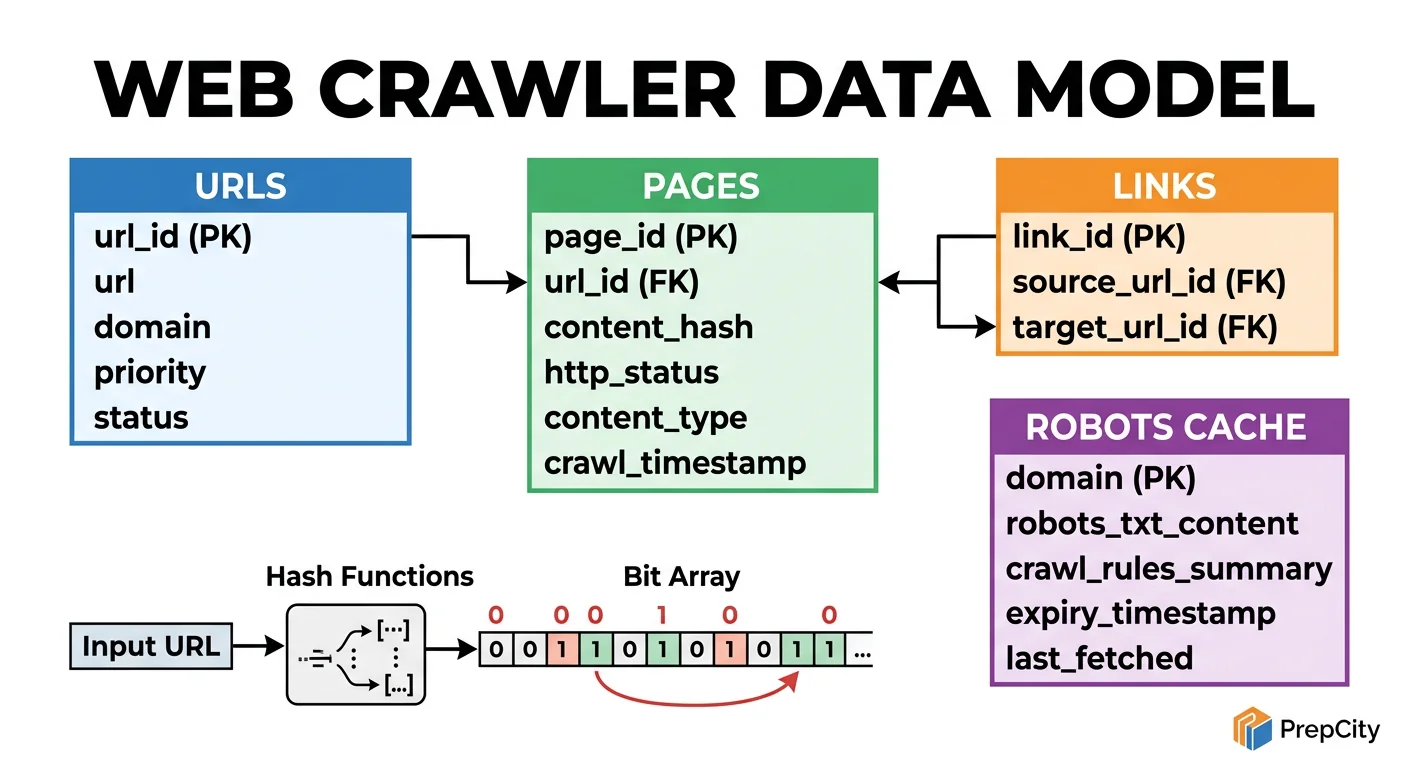
Data Model & Database Design
Use two storage systems: PostgreSQL for structured metadata, S3 (or equivalent blob storage) for raw HTML. Do not try to put HTML content in a relational database - it'll destroy your query performance.
PostgreSQL Schema
urls table
- -url_id BIGSERIAL PRIMARY KEY
- -url TEXT UNIQUE NOT NULL
- -url_hash BYTEA NOT NULL - SHA-256 of canonical URL, indexed for fast dedup lookups
- -domain VARCHAR(255) NOT NULL
- -crawl_status VARCHAR(20) NOT NULL DEFAULT 'queued' - ('queued', 'in_progress', 'done', 'failed')
- -priority INTEGER NOT NULL DEFAULT 100
- -last_crawled_at TIMESTAMPTZ
- -http_status SMALLINT
- -content_hash BYTEA - SHA-256 of page content, for content-level dedup
- -retry_count SMALLINT DEFAULT 0
- -created_at TIMESTAMPTZ DEFAULT NOW()
links table
- -source_url_id BIGINT REFERENCES urls(url_id)
- -target_url_id BIGINT REFERENCES urls(url_id)
- -PRIMARY KEY (source_url_id, target_url_id)
Key Indexes
- -urls(domain, crawl_status, priority) - the frontier query: "give me the next URL to crawl for this domain, ordered by priority"
- -urls(url_hash) - fast dedup check before inserting new URLs
- -urls(content_hash) - detect near-duplicate pages across different URLs
Partitioning
- -Partition urls by domain hash (list partitioning, ~256 partitions). Same-domain URLs end up in the same partition, which matches the crawl access pattern perfectly.
- -The links table gets large fast (billions of rows). Partition by source_url_id range. If you don't need link graph analysis in real-time, consider writing links to a separate analytical store (BigQuery, ClickHouse).
Blob Storage (S3)
- -Key: url_hash (hex-encoded SHA-256)
- -Value: gzipped raw HTML
- -Average object size: ~100KB after gzip (from ~500KB raw)
- -Lifecycle policy: move to Glacier after 90 days if not accessed
Why not MongoDB for HTML? S3 is cheaper by 10x for write-heavy blob workloads, handles concurrent writes without locking, and you never query HTML by anything other than its key.
Deep Dives
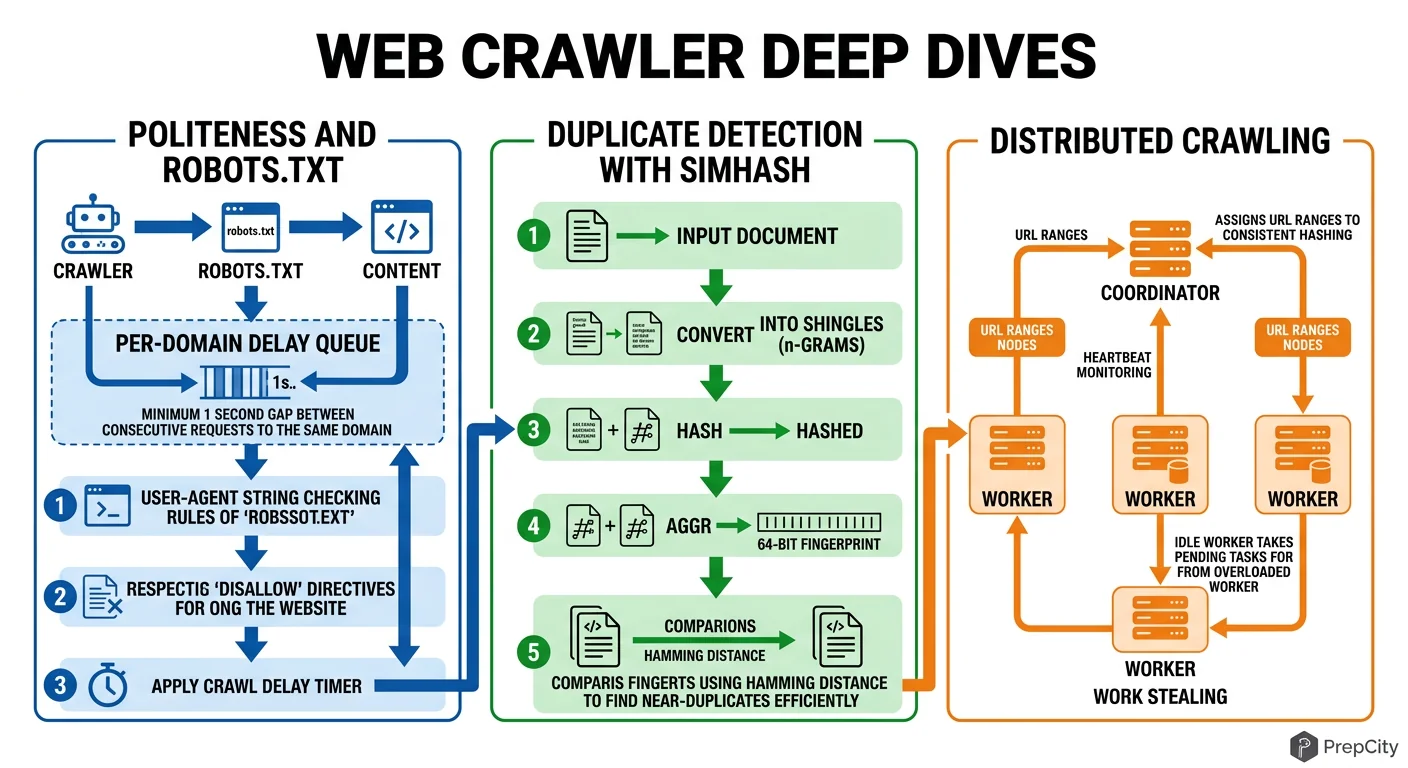
Deep Dives
Deep Dive 1: URL Deduplication at Scale
Problem: The web is full of duplicate URLs. Same page behind http/https, www/no-www, trailing slashes, query parameter ordering, session IDs in URLs. Naive string comparison misses all of these.
Approach: Three-layer dedup.
- -Layer 1: URL canonicalization. Normalize scheme, remove default ports, lowercase hostname, sort query params, strip tracking params (utm_*, fbclid). This catches ~60% of duplicates.
- -Layer 2: Bloom filter on canonical URL hash. Catches another ~35%. Memory-efficient: 2.4GB for 1B URLs at 0.01% false positive rate.
- -Layer 3: Content-level dedup via SimHash. After fetching, compute a SimHash of the page content. Pages with hamming distance < 3 are near-duplicates. Store SimHashes in a separate lookup table.
Tradeoff: Layer 3 requires actually fetching the page, so it doesn't save bandwidth - but it prevents storing and indexing duplicate content. Skip it if storage cost isn't a concern.
Deep Dive 2: Politeness Without Killing Throughput
Problem: Politeness at 1 req/sec/domain means a single popular domain takes forever to crawl. But you have millions of domains, so overall throughput can still be high - if you interleave correctly.
Approach: Domain-sharded frontier. Group URLs by domain in the frontier. Each worker pulls from multiple domains in round-robin, never hitting the same domain twice in a row. The politeness delay becomes invisible because while you're waiting on domain A's cooldown, you're fetching from domains B through Z.
The failure mode to watch for: "domain concentration" - when your frontier has 10M URLs from one domain and 100 URLs each from 1,000 others. The single domain becomes a bottleneck. Solution: cap per-domain frontier size (e.g., 50K URLs max). Excess URLs spill to disk and get re-queued later.
Deep Dive 3: Recovering from Crawler Failures
Problem: A worker dies mid-crawl holding 500 URLs. Those URLs are marked 'in_progress' in the frontier. Nobody else will pick them up.
Approach: Lease-based ownership. When a worker pulls a URL, it gets a lease (timestamp + TTL, typically 5 minutes). If the worker doesn't report completion before the lease expires, a background sweeper resets the URL to 'queued'. Workers send heartbeats to extend leases for slow-but-alive fetches.
This is the same pattern DynamoDB uses for its lock client, and it's battle-tested. The key insight: treat "in_progress" as a temporary state with automatic expiry, not a permanent flag.
Trade-offs & Interview Tips
Key Trade-offs:
- -Priority crawling vs. breadth-first: Priority crawling (PageRank-like scoring) gets you high-value pages faster, but adds complexity to the frontier. For a general-purpose crawler, start with breadth-first and add priority scoring later. For a search engine, you need priority from day one.
- -Bloom filter vs. persistent dedup store: Bloom filters are fast and memory-efficient but lose state on restart and have false positives. A persistent hash set (RocksDB) survives restarts but is slower. Use both: Bloom filter as the hot path, RocksDB as the source of truth for rebuilding the filter after restarts.
- -Centralized vs. distributed robots.txt: A central robots.txt cache is simpler but becomes a bottleneck at scale. Distribute it - cache robots.txt on the same Redis shard as the domain's URLs. One cache miss per domain per 24 hours is negligible overhead.
- -Storing raw HTML vs. extracted text only: Always store raw HTML. Extraction logic improves over time, and you'll want to re-extract without re-crawling. S3 is cheap. The 10x cost of re-crawling is not.
What I'd Do Differently
- -Start with Go instead of Python for workers. The goroutine model handles 10K concurrent connections more naturally than Python's asyncio. Python is fine for the content extractor.
- -Use a proper URL frontier library (like Mercator) instead of building one from scratch on Redis. The edge cases in frontier management are numerous and subtle.
Interview Tips
- -Interviewers love the politeness discussion. Bring it up early and explain the domain-sharded approach - it shows you understand the real constraint.
- -Always mention robots.txt unprompted. Forgetting it is an instant red flag.
- -The estimation section matters more than usual here because the numbers (50TB/day for HTML) are surprisingly large. Show you understand that raw content goes to blob storage, not a database.
- -If asked "how would you handle JavaScript-rendered pages," the answer is: headless browser pool (Playwright/Puppeteer) behind a rendering service, but only for pages that return empty bodies with static fetch. Don't render everything - it's 100x more expensive.
Ready to be interviewed on this?
Our AI interviewer will test your understanding with follow-up questions
Start Mock Interview